
Kalimera AI for LangGraph Developers
Build and run production voice agents on the graph model you already know — without assembling the STT/TTS, telephony, deployment, testing, and observability stack yourself.
1What Kalimera AI is
Kalimera AI is a model-agnostic voice conversational-intelligence platform that runs your agent logic as a LangGraph orchestration under the hood, and wraps it in everything a voice product needs that a graph library alone doesn't give you: telephony (SIP), the real-time STT → reasoning → TTS loop, turn-taking and barge-in, a visual workflow builder, prebuilt action tools, live human supervision, a full testing/debugging suite, and analytics. You keep the graph you already know how to design — nodes, state, tool calls, conditional routing — and Kalimera provides the runtime it lives in, the voice I/O layer, the integrations around it, and the tooling on top. Configuring an agent is one part of the story; the larger value is that everything you'd otherwise assemble and operate comes with it.
2Kalimera vs LangChain / LangGraph
The honest framing: this isn't an either/or. LangChain and LangGraph are libraries; Kalimera is a platform built on the same graph paradigm. You're not replacing the way you think — you're skipping the months of integration around it.
On raw LangChain/LangGraph you'd stitch together a graph runtime, a telephony provider (Twilio/SIP), an STT vendor, a TTS vendor, a tracing tool (LangSmith), a vector store for retrieval, a test harness, and your own hosting. Kalimera is that whole stack, pre-integrated, with a visual builder and a purpose-built voice debugger on top.
| Dimension | LangChain / LangGraph (raw) | Kalimera AI |
|---|---|---|
| What it is | Orchestration library (Python/JS) | Managed voice platform on the same graph model |
| Voice I/O (STT/TTS) | You integrate vendors & stream audio yourself | Built-in real-time pipeline |
| Telephony | Not included — add SIP/Twilio, DTMF, transfer | SIP integration + Dial Plan Manager |
| Barge-in / interruption | Hand-rolled | Configurable: interrupt on speech + resume-from-point |
| Building the graph | Code only | Visual builder + YAML; drop to code inside nodes |
| Custom logic | Custom nodes (full code, your own sandboxing) | Sandboxed Custom Code node (Python/JS) + any-API tools |
| Model choice | Provider SDK wired in; swap = code change | Model-agnostic; per-node model selection in config |
| Sub-second canned replies | Build your own fast path | Static Prompt node (<1s, variable-aware) |
| Routing visibility | Logs / text traces | Visual routing-decision overlays + timing badges |
| Debugging a run | LangSmith traces | Live node highlighting, prompt peek, LLM playground, API logs, variables drawer |
| Testing | Write your own harness | Regression suite w/ AI judge, multi-model benchmark, phone/voice sim |
| Deployment | Self-host / LangGraph Platform | Managed, concurrent runtime |
| Live-call observability | Build it | Session stats, transcripts, recordings, sentiment/KPIs |
| Human-in-the-loop | Build it | Observe / whisper / take-over |
| Compliance | Your responsibility | Recording, transcription, machine-disclosure handled |
3Why the move is easy if you know LangGraph
The mental model transfers almost one-to-one, so there's next to no conceptual ramp:
- Your
StateGraph→ a Kalimera workflow (nodes + edges) - Your nodes → Conversation, API Request, Set Variable, Custom Code, Farewell nodes
- Conditional edges / routing → prioritized, re-pointable workflow edges
- Custom Python nodes → the sandboxed
Custom Codenode
- Tools bound to a model → webhooks/tools embedded in the agent node
- Checkpointer / state → managed conversation state across turns
- LangSmith-style tracing → built-in per-call observability & transcripts
- Per-node model config → edge-evaluation vs processing models, set per node
You spend your time on conversation design and business logic, not on the audio/telephony/ops/integration substrate.
4The workflow builder & node types
Workflows are built on a visual canvas from a node palette, and defined declaratively (YAML) underneath — so they're versionable, diffable, and reviewable in a PR. You drag nodes, connect handles, and click a node to configure it.
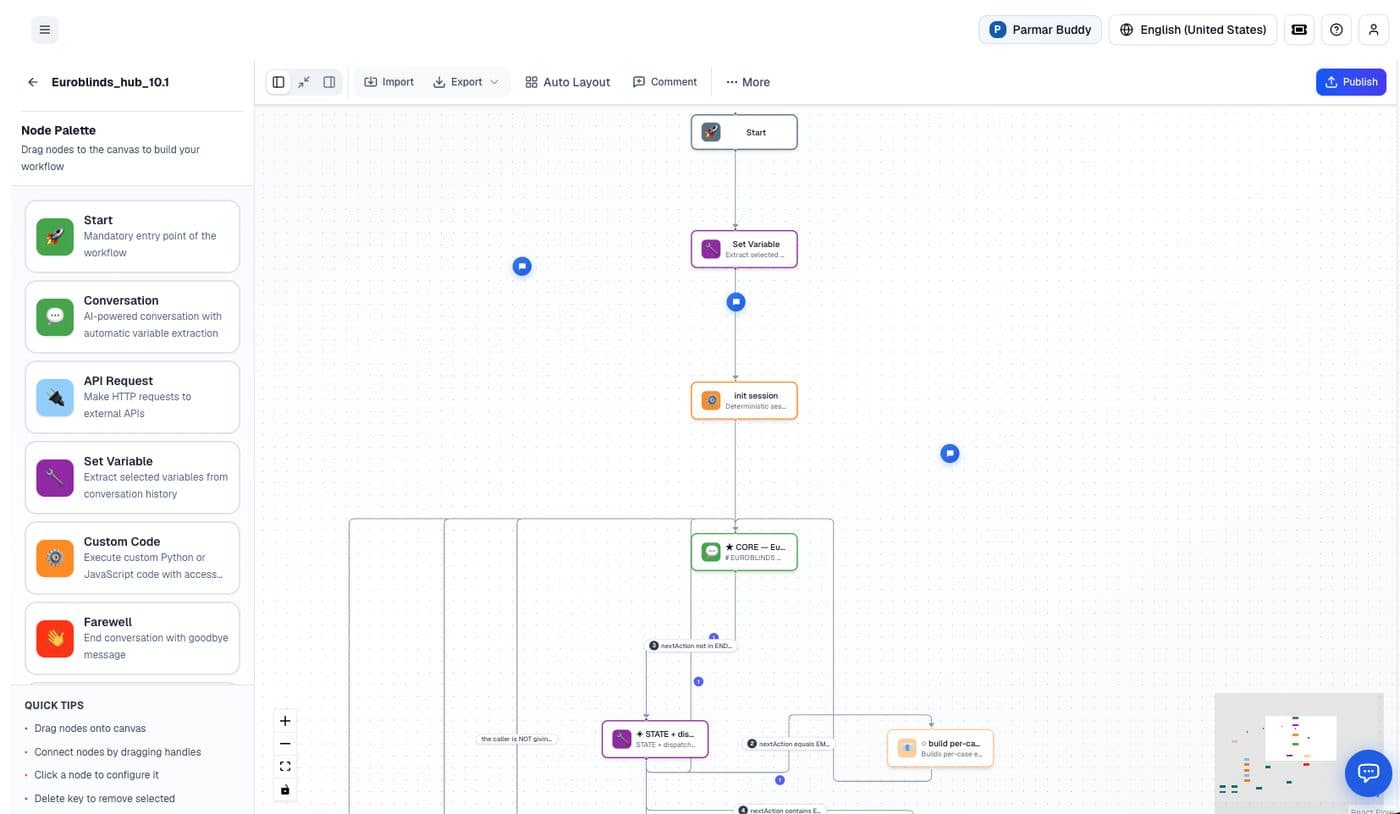
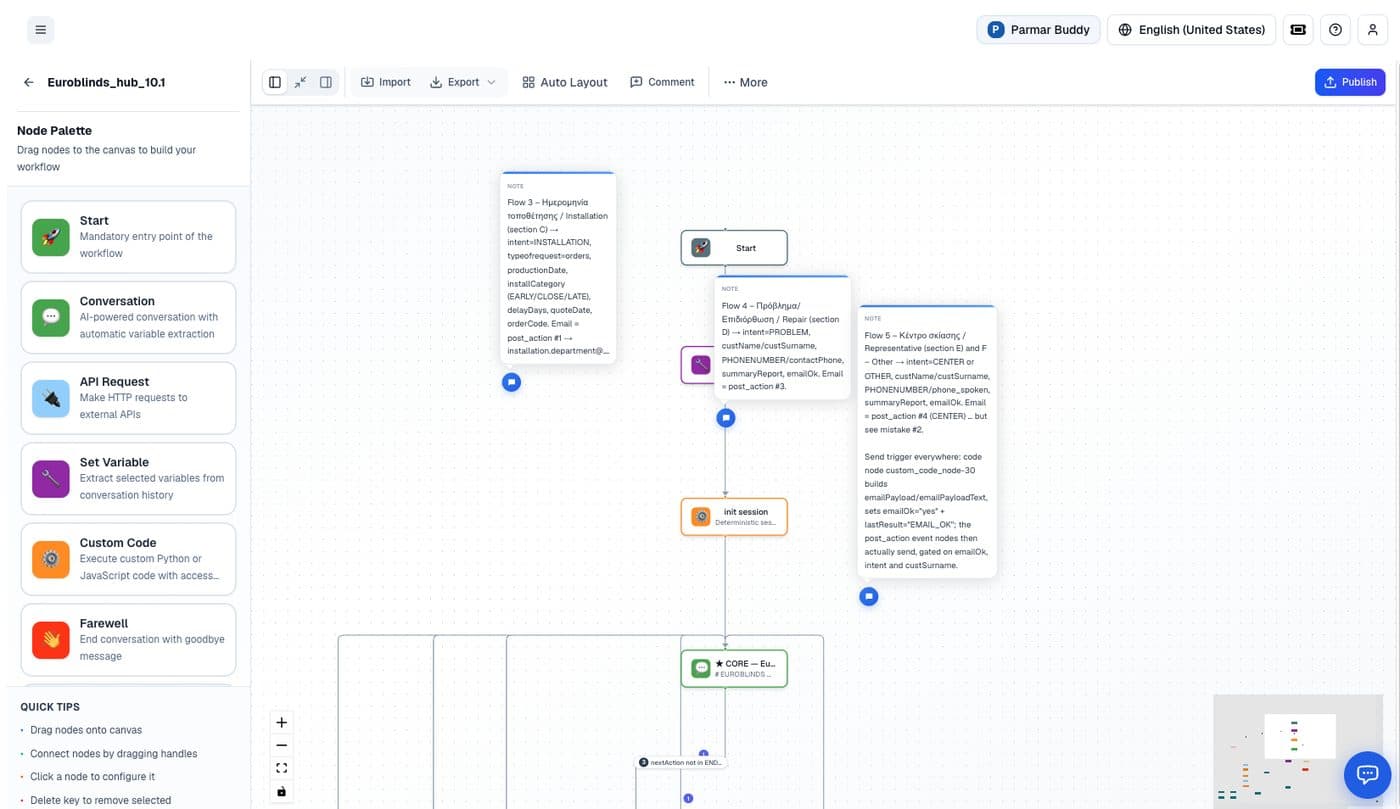
init session, a single speaking core node, and per-case branches with sticky-note documentation on flows and post-actions.Conversation node — with Static Prompt
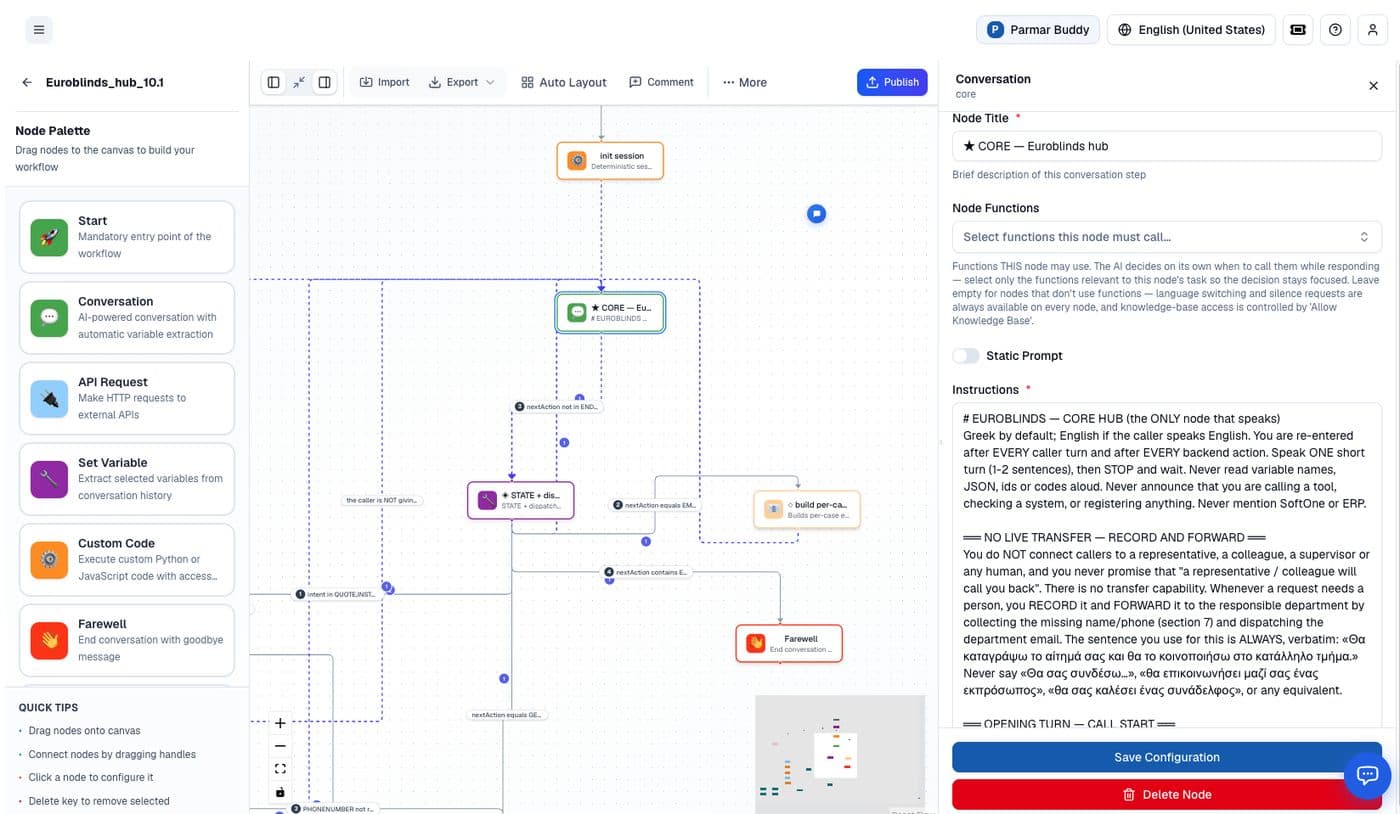
AI-powered conversation with automatic variable extraction; select which functions the node may call.
Each node can pick exactly which tools/functions the model is allowed to call, keeping decisions focused. The Static Prompt toggle (below) is the standout: when enabled, the node speaks an exact message instead of generating one — bringing response time under one second. The message still supports {variable_name} and {global.variable_name} substitution, so paired with a Custom Code node you can build a per-language line and still answer sub-second.
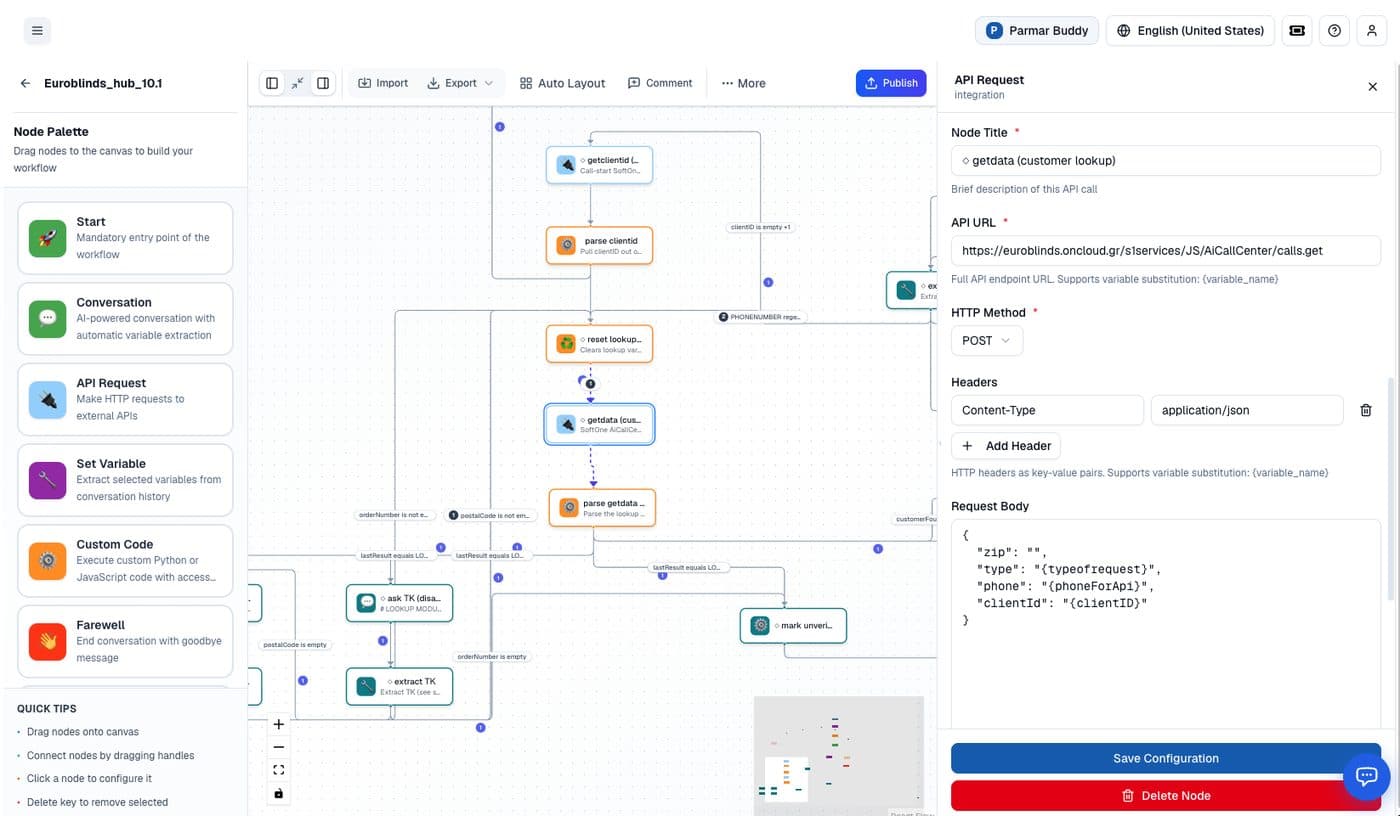
API Request node — any REST endpoint as a step
Point a node at any HTTP endpoint, with method, headers, and a request body that supports {variable} substitution. This is how the graph reads and writes to your systems (order lookup, CRM, KYC) without you writing a REST client, auth handling, or retry logic per integration.
Custom Code node — the escape hatch, sandboxed
When declarative isn't enough, write real Python or JavaScript in a sandboxed node. You read and write variables[…] / global_variables, see user_message and calling_number, and call the workflow's enabled plugin functions. Imports come from a safe allowlist plus Key Vault access for secrets. This is the LangGraph "custom node" pattern with guardrails — keep turn-level logic here and let heavier or offline work reach the agent via a webhook/tool.
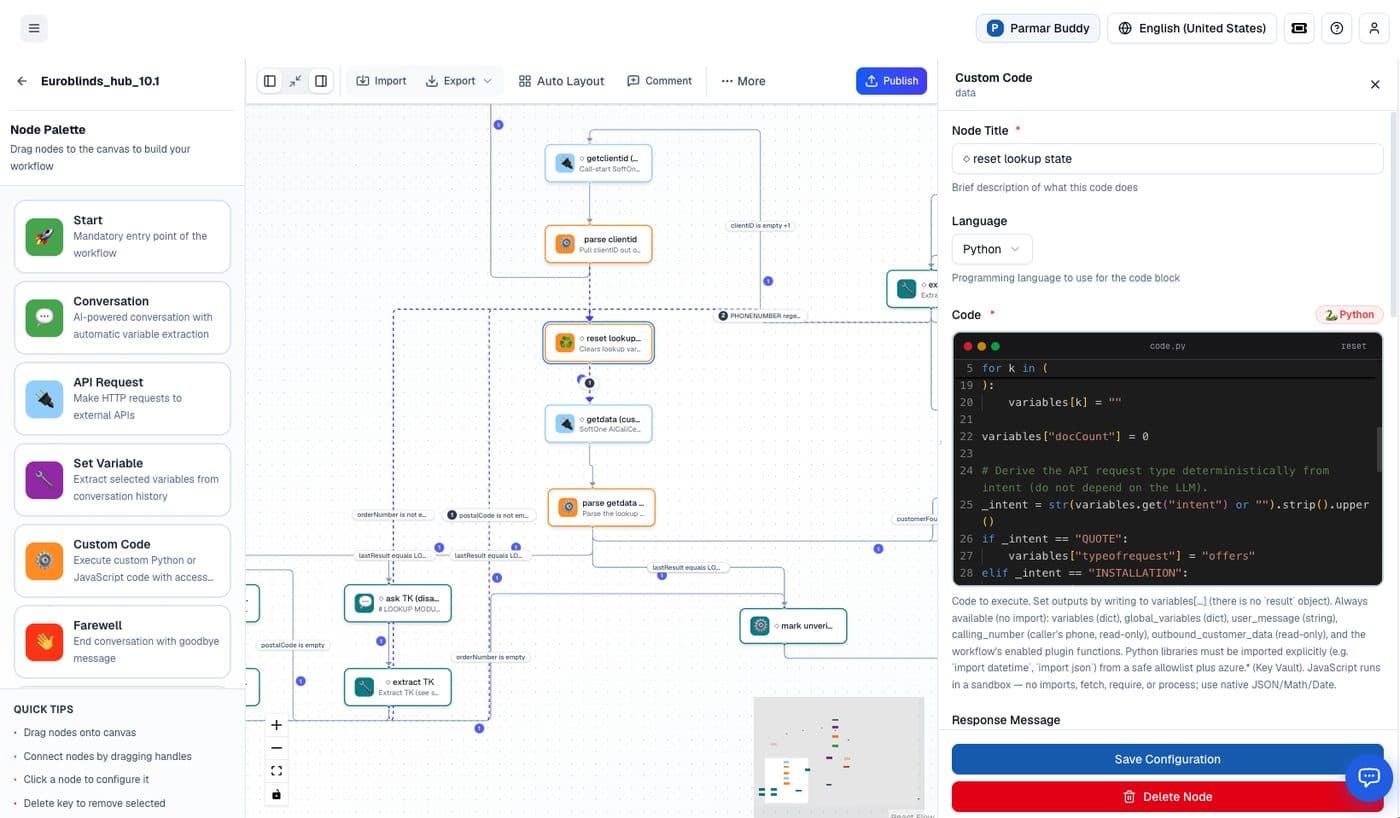
result object, you set outputs by writing to variables.5Workflow control a LangGraph dev will appreciate
Recent platform work targets exactly the things you'd otherwise hand-tune in code:
- Static Prompt (sub-1s replies). Deterministic, variable-aware node responses that skip a model round-trip where you don't need one — the single biggest latency lever in a voice flow.
- Per-node model selection. Set an Edge Evaluation Model on the Start node for routing and an LLM Model on extraction nodes for processing; leave a node on Default to inherit the workflow model. Cheap/fast models for routing, stronger models where it matters — without leaving the graph.
- Edge priority & re-pointing. Control execution order among a node's outgoing edges (lower number runs first), and re-point an edge's start or end node after creation from the Edge Properties panel.
- Interruption handling. Two independent settings — interrupt the agent the moment the customer speaks (with a minimum chunks sensitivity control), and resume from the interruption point rather than restarting.
6Prebuilt action tools — batteries included
These are the actions you'd otherwise implement against Twilio, an email provider, or the telephony layer. In Kalimera they drop into the graph with auth, delivery, and error handling already handled:
- Custom tools (add any API). Register any external REST endpoint as a callable tool — the agent can hit any API in your stack from inside the flow. If it has an API, it becomes a tool.
- Send SMS. Fire a text mid- or post-call — booking/payment links, confirmations, follow-ups — with no messaging-provider integration.
- Send email. Send confirmations, summaries, or follow-ups from within the flow; no SMTP/ESP wiring.
- Custom code. The sandboxed Custom Code node above, for arbitrary in-turn logic.
- Forward / transfer number. Hand the live call to a human or another number for escalation or warm transfer.
7Beyond the agent: the platform you inherit
Adopting Kalimera hands a LangGraph developer an entire operational stack they'd otherwise build and maintain.
- Managed deployment & scale. Long-lived, stateful calls are hostile to naïve deployment; Kalimera runs them as a managed, concurrent runtime that handles high volume. One platform, one bill — instead of separately contracting and metering STT + TTS + LLM + telephony + hosting.
- Model-agnostic & broad model support. A wide, team-evaluated model range (GPT, Gemini and GLM approved for production; others for evaluation), with per-model tuning like GPT reasoning-effort and Gemini serving region. Swap or upgrade at the config layer, never in the graph.
- Integrations without glue code. CRM logging with real-time dashboards, calendar booking/confirmation/reminders, and business-system connections — prebuilt, not hand-rolled.
- Built-in knowledge base. Attach a knowledge database to a dialog and retrieval is handled — an entire RAG subsystem you don't build or operate.
- Analytics & BI. Aggregate sentiment/frustration trends and per-dialog KPI/goal attainment measured on every conversation — the logging → warehouse → dashboards pipeline, done for you.
- Compliance at the platform layer. Recordings, transcriptions, machine-disclosure, and PII handling sit below your logic — a real unblock the moment you touch regulated domains.
- Dev + non-dev collaboration. The visual/no-code layer lets PMs, ops, or the client co-edit prompts and routing while you own the code nodes and tools; versionable configs keep their changes in your review flow.
- API-first & embeddable. Trigger agents, launch outbound campaigns, and embed voice into your own product programmatically — a component you compose, not a walled garden.
- Live human-in-the-loop supervision. Observe a live call, whisper to the AI or caller, or take full control mid-conversation.
8Testing, debugging & observability
A purpose-built debugger for the people building the agents — the part that usually doesn't exist for a voice graph.
This is where the platform earns a developer's trust. Instead of print-debugging a phone call, you get a testing panel that runs an agent and shows exactly what it did, step by step. Grouped by what it gives you:
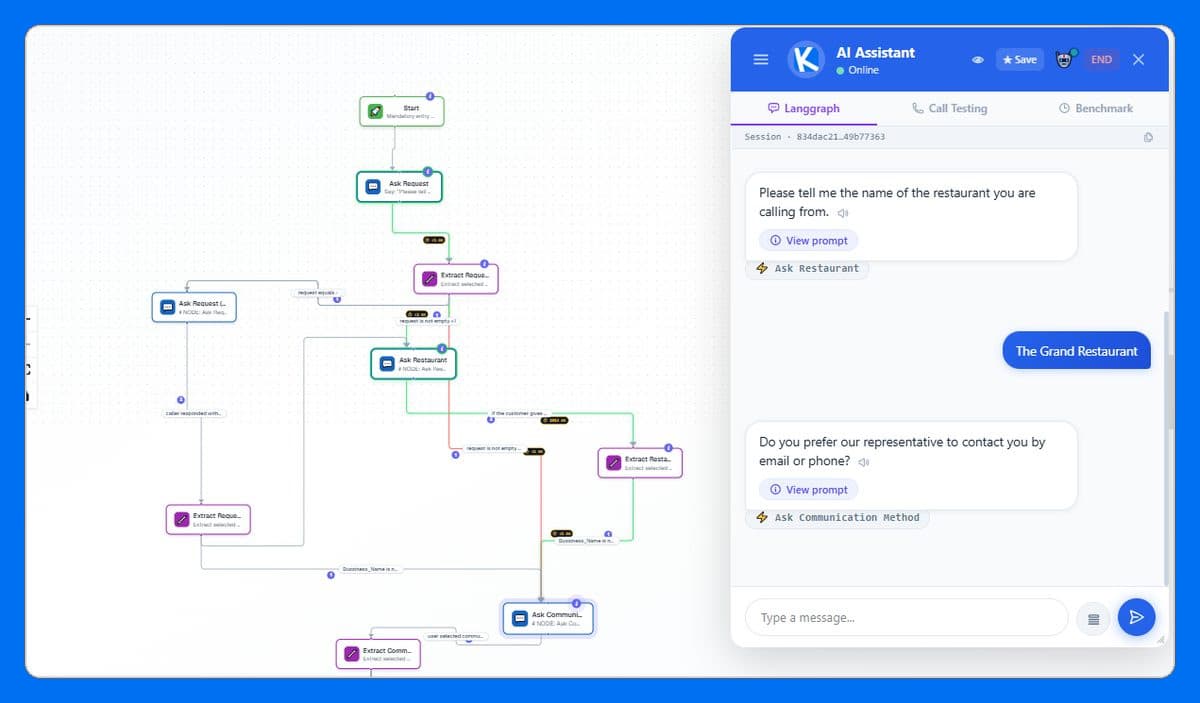
See what the graph did
- Live node highlighting. Chat with the agent while the workflow diagram lights up the exact node running, edge by edge.
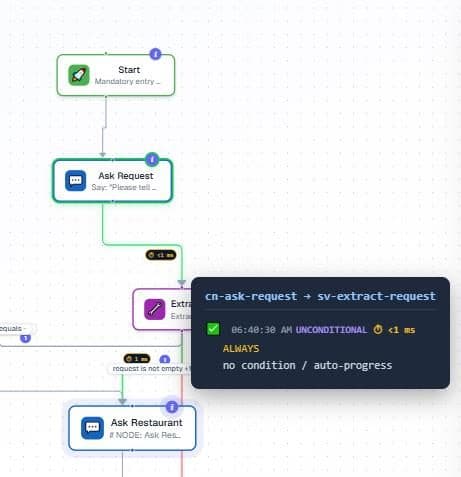
- Routing-decision overlays. See why the workflow took one edge over another — condition, priority, timing, and the AI routing reasoning behind it.
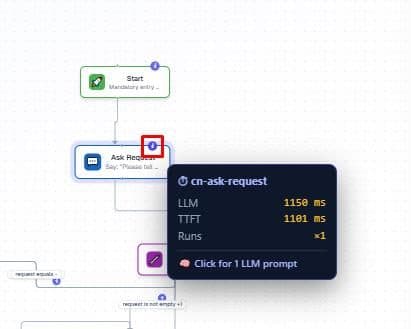
- Node timing badges. Hover any node for its LLM time, time-to-first-token, and run count — latency you can actually see.
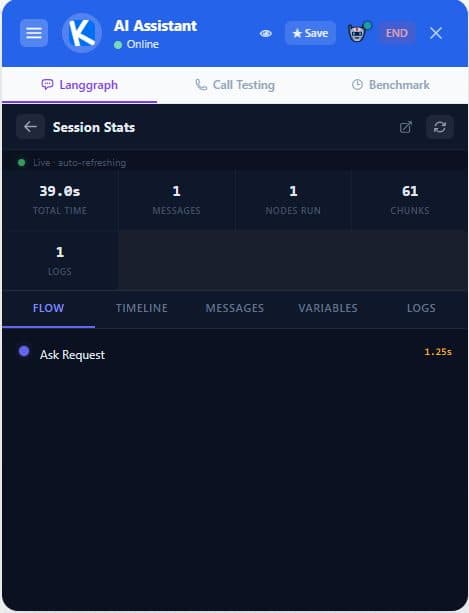
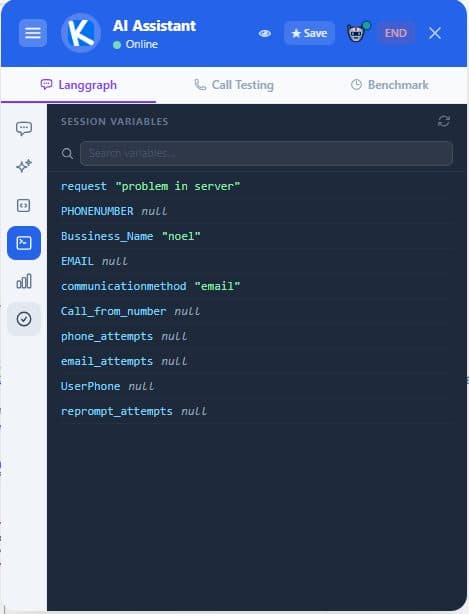
- Session stats & variables drawer. A live breakdown by node, timing, messages, and logs, plus a searchable view of every session variable as it changes.
Inspect and re-run the LLM
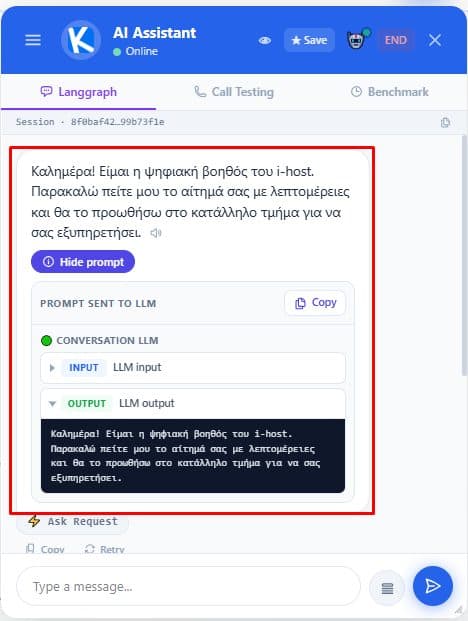
- Prompt peek. Expand any bot reply to see the exact prompt sent to the LLM and the raw output behind it.
- LLM playground. Take any call the workflow made, edit the prompt, and re-run it live — without affecting the chat.
- API call logs. Full request/response detail for every external API call, copyable as cURL.

Test like you mean it
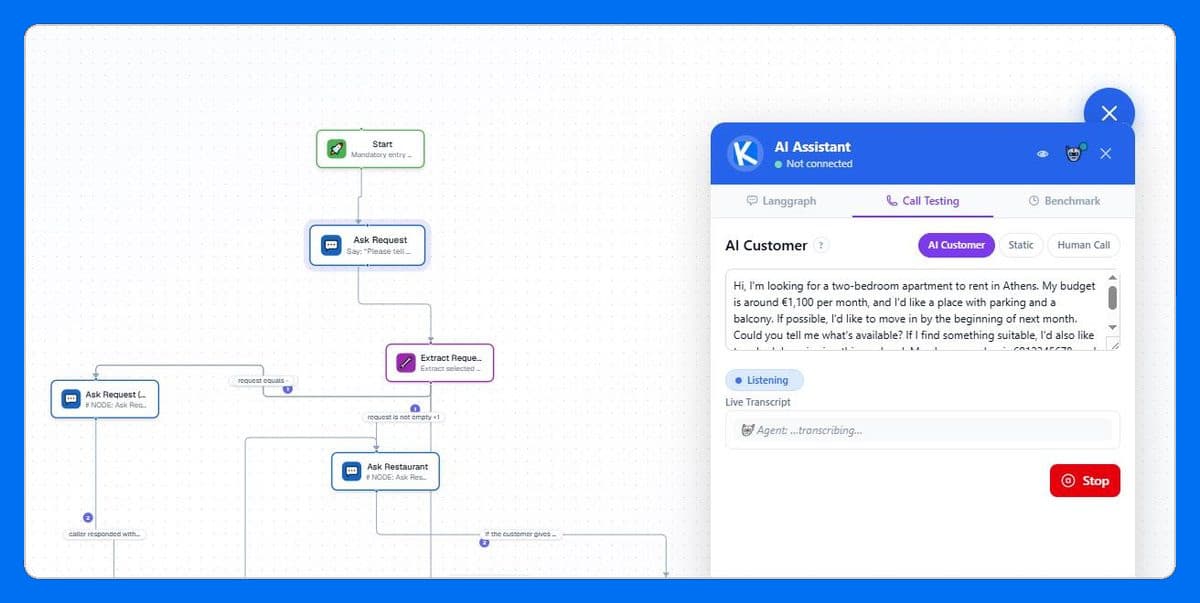
- Phone-call & voice simulation. Run a simulated call three ways — an LLM playing a customer persona, a fixed script for repeatable checks, or a real human-call mode where you speak into your mic and hear the agent back, with barge-in.
- Bulk / scripted replay. Replay a whole scripted conversation automatically, one line at a time — and pull a real customer call straight from the call log into replay to reproduce an issue.
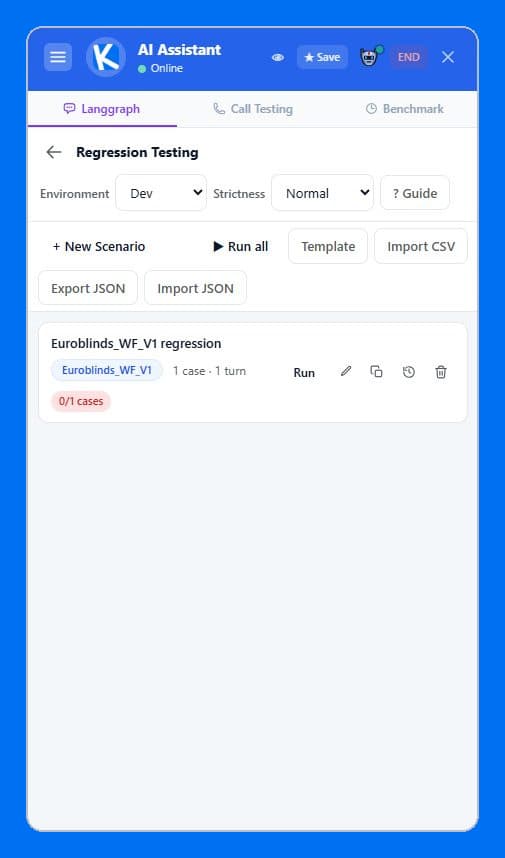
- Regression testing with an AI judge. Save test cases and re-run them automatically; an LLM judge scores each reply against what's expected, at a strictness you choose. Import from CSV, export/import as JSON.
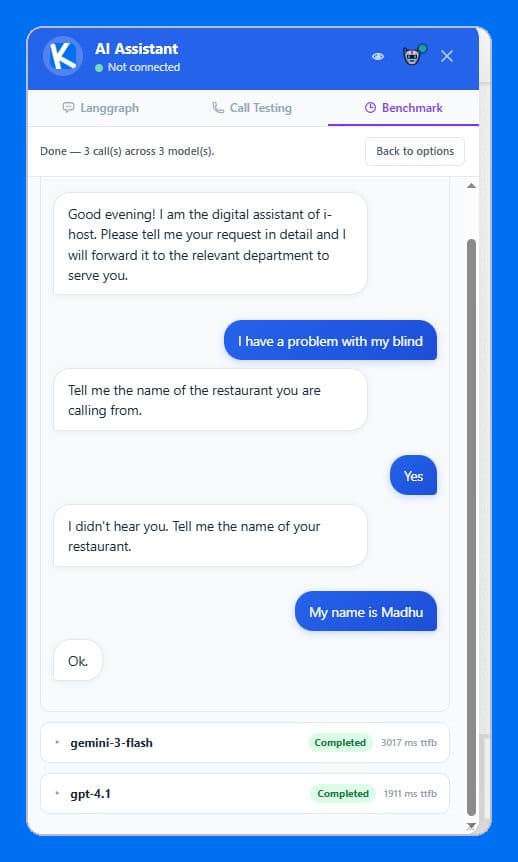
- Multi-model benchmarking. Run one test script across several models side by side to compare quality and latency before you commit.
- Run post-actions. Review and correct variables before firing the agent's post-call automation (the SMS/email/webhook sends).
Manage it from Claude
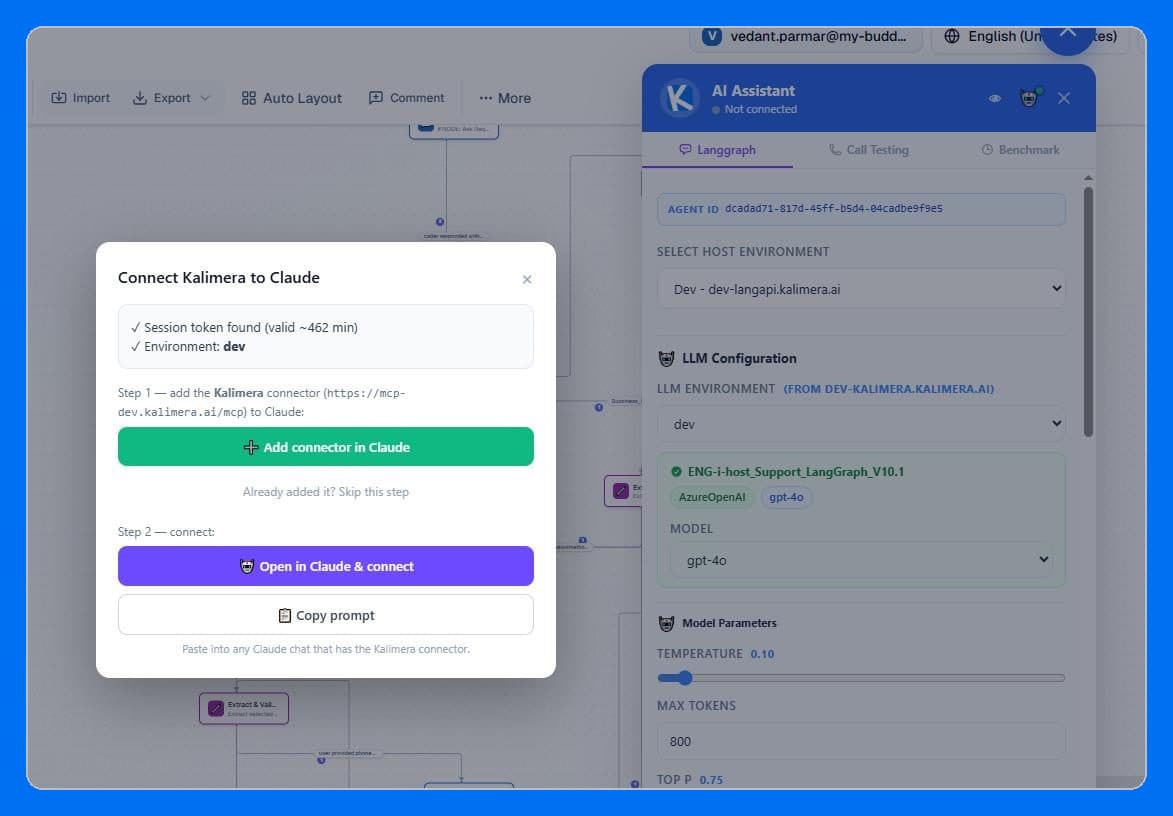
- Claude.ai / MCP integration. One click connects a Kalimera session to Claude as an MCP connector — name, URL, and tool permissions auto-filled — so you can manage and iterate on agents by chat.
9Proof points
Kalimera is in production across voice-commerce, booking/scheduling, and internal-operations use cases. Representative examples (anonymized):
- Inbound voice-commerce agent (Shopify). One reusable agent handling product search, cart/checkout, order status, and store-policy questions over the phone — a multi-intent inbound flow that would be a substantial LangGraph + telephony + RAG build from scratch, delivered as one declarative workflow with custom-API tools into the storefront, SMS for order links, and a knowledge base for policy answers.
- Internal supply / operations desk agent. A voice agent fielding internal branch calls for stock and procurement across a multi-branch franchise — routing, lookups, and structured capture over the phone.
- Multi-branch booking / clinic-style flows. Calendar-integrated booking, confirmation (SMS/email), and reminders with practitioner/branch routing and transfer-to-human on escalation.
Platform-level latency: the Static Prompt node answers in under one second by skipping the model round-trip on deterministic turns — a concrete lever you can point to.
10Getting started
The onboarding path for a developer, roughly in order:
- Orient on a sample. Open an existing workflow — if you know LangGraph, one worked example is enough to map node types, routing, and agent-node tools.
- Clone a template. Start from a prebuilt agent, not a blank graph; study the YAML.
- Wire a custom-API tool. Point one API Request node at a real endpoint of yours — the "any API becomes a step" moment.
- Add an action. Attach Send SMS or Send email so the agent can follow up; confirm it fires end-to-end.
- Attach a knowledge base. Connect a domain KB to a dialog — the step that replaces a whole RAG build.
- Drop into Custom Code. Move one piece of turn-level logic into the sandbox and try a Static Prompt for a sub-second reply.
- Dial in & test transfer. Connect a number via the Dial Plan / SIP config, place a live call, and try forward-to-human.
- Debug & regression-test. Watch it run with live node highlighting and timing badges, then save the run as a regression case with an AI judge.
- Iterate in YAML, review in PRs. Version workflows like any other code.